

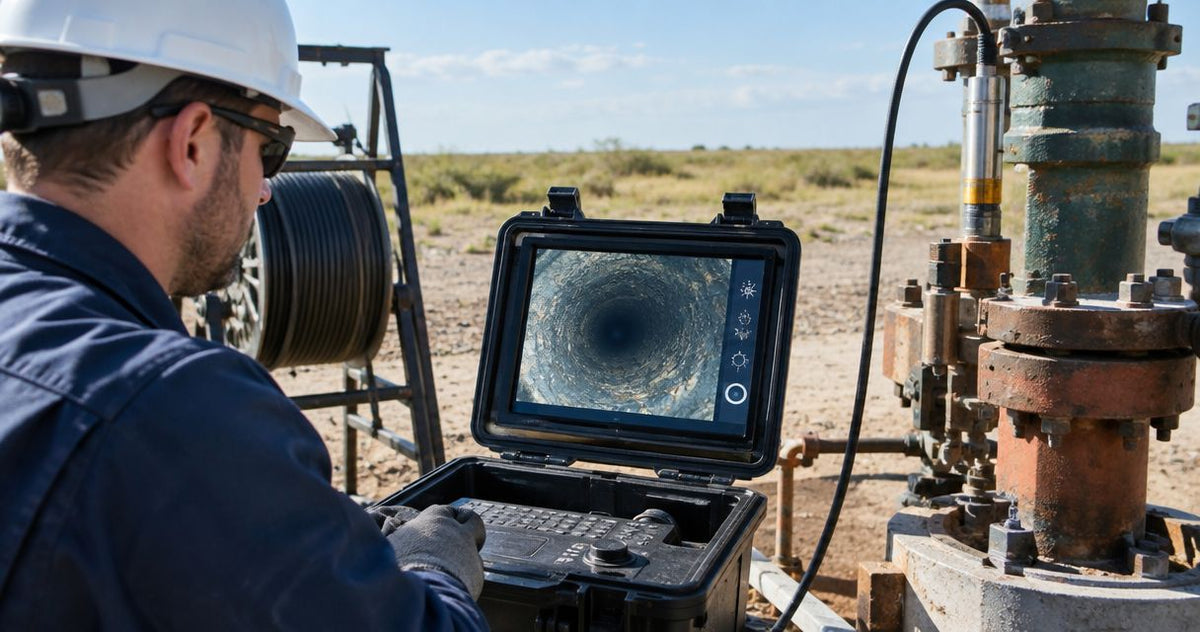
Instead of reconstructing casing depths from video after a well inspection, establish a fixed surface reference, check the cable counter, and record each observation while the camera is stationary. This workflow connects the footage to the measured cable position so you can revisit a casing joint, screen interval, obstruction, or suspected damage without guessing where the image was captured.
Use one reference throughout the inspection and check the counter over a measured 10 ft (3.05 m) of cable before deployment. A useful well camera depth counter log pairs every observation with a reference, counter reading, and video location. Fiberscope.net sells well inspection equipment and services it in-house; this guide focuses on the field procedure rather than individual recorder controls.
Before you start
A measured 10 ft (3.05 m) payout check gives you a practical starting check for the counter. Complete the access and equipment checks before placing the camera over the well.
- Gather the camera system, its operating instructions, suitable recording media, a measuring tape, and a field log. Establish the well identifier, available construction records, expected inspection depth, and inspection objective.
- Assess casing diameter, restrictions, water conditions, and pump or cable clearance. Match the equipment to both the deployment and the submerged conditions; use the well camera depth-rating guide when selecting equipment for the job.
- Establish where the camera's viewing point sits when you set zero. The counter measures cable movement through its measuring mechanism; reference position, cable slack, and the distance to the viewing point affect how that reading relates to an observed feature.
Keep the wellhead protected during setup and follow the site's equipment-cleaning and well-protection procedure. Route cables and position the reel so you can maintain control during both lowering and retrieval.
By Vladimir Khubiryants, Founder & President, Fiberscope.net (MEDIT Inc.).
Surface reference and counter check
Set the inspection reference to 0 ft (0 m) at an identifiable physical point, such as the top of the casing. A reference another technician can find again makes later inspections comparable.
Establish the reference
- Select a stable, accessible reference point and describe it in the field log. Write the actual location, such as the top edge of the casing at the access opening.
- Photograph the reference and the cable route. Include enough context to identify the same point during a return visit.
- Position the camera's relevant viewing point at that reference wherever access permits. For a head with different viewing directions, record which view defines your depth observations.
- Use the counter's reset procedure from the equipment instructions. Record the displayed starting value and measurement units.
- Keep the measuring mechanism, cable guide, and reel position consistent throughout the inspection.
Expected result: the field log identifies the physical reference, the viewing point used, the starting reading, and the units.
If access requires the camera to start below the reference, measure and record that separation. Document the correction explicitly and preserve the original counter reading alongside the corrected observation depth.
Check payout and retrieval
- Measure a 10 ft (3.05 m) cable interval independently with the tape. Keep the cable controlled and follow the manufacturer's counter-check procedure.
- Move that interval through the measuring mechanism in the deployment direction. Compare the displayed change with the measured interval.
- Reverse the movement through the same interval. Check that the reading returns to its starting value.
- Repeat the check after repositioning the cable as it will run during inspection. Watch for slipping, intermittent counting, or inconsistent contact with the measuring wheel.
- Record the measured interval and displayed changes. Apply the manufacturer's calibration procedure where the equipment provides one.
Expected result: the counter responds consistently in both directions, and you have a written record of the check. Use the equipment's documented acceptance criteria rather than assigning a tolerance to the instrument yourself.
Recording setup and observation log
Use one depth unit throughout the working log and retain the original counter readings. Converting units during field entry adds an unnecessary transcription step; convert the finished report consistently when required.
Prepare the recording
- Identify the recording with the well identifier and inspection date. Use the same identifier in the field log.
- Start a short test recording above the well. Play it back and check image quality and file access.
- Record the surface reference and starting counter value in the opening footage or an accompanying identification image.
- Check how depth will be associated with the recording. Use the recorder's documented overlay function where provided; otherwise record the counter reading and video time together in the field log.
- Start the inspection recording before lowering through the reference. Note the file identifier whenever a new file begins.
Expected result: a playable file connects the well identifier and reference to the start of the inspection.
Keep depth and video time in separate fields. Time identifies a position in a recording; depth identifies a position relative to the inspection reference.
Build the field log
Use the following table as a blank reporting structure. Its purpose is to preserve the connection between the physical reference, instrument reading, and image evidence.
| Log field | What to enter | Why it matters |
|---|---|---|
| Well identifier | Site and well designation | Connects footage to the correct asset |
| Reference | Physical zero location and viewing point | Makes the depth convention repeatable |
| Counter reading | Original displayed value and unit | Preserves the instrument observation |
| Observation depth | Corrected value when an offset applies | Connects the feature to the reference |
| Video location | File identifier and playback time | Makes the evidence retrievable |
| Direction | Lowering or retrieval | Separates observations from different passes |
| Observation | Visible feature and its extent | Distinguishes evidence from interpretation |
| Visibility | Clear, obscured, or partly visible | Records the conditions affecting the image |
Prepare the deployment route before recording. The borehole camera deployment guide covers the access and deployment decisions that sit alongside this logging procedure.
Depth-linked inspection pass
Record a depth only after stopping the camera and allowing movement to settle. A stable image and stable counter reading give you a clearer association between the observed feature and its position.
Log casing observations
- Lower the camera under controlled tension while watching the image and counter. Follow the equipment's deployment instructions and cable-handling limits.
- Stop at a feature that needs documentation. Record the displayed counter reading, file identifier, and playback time.
- Capture the feature with the viewing direction appropriate to the task. Describe the visible condition plainly: an opening, displaced joint, deposit, restriction, or damaged surface.
- For an interval, record its upper and lower observed boundaries separately. State the viewing direction and inspection direction used for each boundary.
- Note changes in water clarity, suspended material, and camera position that affect visibility.
- Resume lowering only after completing the entry. Keep the recording running through the transition when practical so the feature retains its surrounding context.
Expected result: every significant entry leads directly to an identifiable location in the footage and an associated counter reading.
Describe what the image shows before assigning a cause. For example, record an opening at a joint and its visible extent; keep any proposed explanation in a separate interpretation field.
A downward view helps you assess the route ahead. A side view helps you examine casing walls and screen openings. When changing views, account for the physical position of each viewing point using the equipment's geometry and your reference convention.
Close the depth loop
- On retrieval, revisit distinctive features recorded during lowering. Log the return readings beside the original entries.
- Compare the readings while retaining both values. Investigate differences against cable routing, counter engagement, camera movement, and the exact feature selected.
- Bring the original viewing point back to the surface reference. Record the closing counter value before resetting anything.
- Save the footage and field log together. Check that the last file plays and that all observation entries identify the correct file.
Expected result: the inspection includes an outbound check, return observations, and a closing reference check. These records help expose counter drift or handling changes before the equipment leaves the site.
Repeat inspections after cleaning or repair
For a before-and-after inspection, keep the same physical zero and depth convention on both passes. Matching the reference is the first requirement for comparing the same casing interval.
Use separate recordings and logs for the initial and follow-up passes. Label the intervention between them, such as cleaning or repair, and retain the original observations unchanged.
| Inspection approach | Use it for | Main advantage | Practical limit |
|---|---|---|---|
| Continuous pass | General casing and screen context | Preserves the route between features | Moving images make individual details harder to examine |
| Stop-and-log pass | Joints, restrictions, and damaged areas | Connects stationary evidence to depth | Requires more field entries |
| Matched repeat pass | Before-and-after documentation | Compares the same recorded intervals | Depends on consistent reference and viewing geometry |
At each comparison location, stop, record depth, and reproduce the viewing direction as closely as the equipment allows. Include the surrounding casing or screen pattern so the reviewer can recognize the location independently of the number.
The follow-up log should distinguish a change in visible condition from a change in visibility. Cleaner water, different lighting, and a different camera position can change how an unchanged surface appears.
Troubleshooting counter and footage mismatches
A 10 ft (3.05 m) check that changes between payout and retrieval calls for a counter or cable-routing check before deployment. Resolve the measurement problem at the surface rather than compensating for it in the report.
- The counter moves while the image stays stationary. Stop paying out cable and assess slack or a restriction. Retrieve under controlled tension according to the equipment instructions before continuing.
- The reading jumps or stops changing. Inspect cable engagement with the measuring mechanism, its routing, and accessible contact surfaces. Follow the manufacturer's cleaning and adjustment procedure, then repeat the measured check.
- The same joint has different readings on retrieval. Check that the camera is stationary at the same part of the joint and uses the same viewing point. Retain both observations and investigate the counter return check.
- The footage lacks a visible depth value. Use the field log's counter readings and playback times to associate observations with the recording. Keep that relationship explicit in the final report.
- The closing reading differs from the starting reading. Preserve the discrepancy and repeat the surface check. Review affected depth entries before using them for repair positioning.
Separate image interpretation from equipment selection. The casing and screen inspection guide addresses the viewing requirements behind these observations.
Customize the inspection record
Keep at least three linked records: the original video, the field log, and the finished report. Each serves a different purpose, and retaining the originals preserves the basis for later review.
Add fields that answer the actual job: casing and screen intervals, visible restrictions, pump or cable clearance, or the position of an obstruction. Mark uncertain observations for review and identify the image conditions that limited the view.
Fiberscope.net matches well inspection equipment to casing restrictions, deployment depth, water conditions, and the evidence the contractor needs. That equipment review belongs before the field visit, when head clearance and reel handling can still be addressed.
- A well camera depth counter needs a fixed surface reference and a measured payout check.
- Record casing observations with counter readings, viewing direction, file identifiers, and playback times.
- Fiberscope.net matches well inspection equipment to access, depth, water conditions, and required evidence.
FAQ
Can I compare the camera log with an older well completion report?
Yes, after reconciling the depth references and units. Record any difference between the completion report's datum and the camera inspection reference before comparing casing or screen intervals.
Should I round depths when entering the field log?
Preserve the displayed reading in the field log. Apply the project's reporting convention separately, and keep the original readings available for review.
Can I pause the recording between casing observations?
You can, but each restarted recording needs an identifiable file and a depth entry. Continuous recording preserves the visual connection between successive observations.
What should I retain when handing the inspection to another contractor?
Provide the original footage, field log, reference description, counter-check record, and finished report. Include the viewing-point convention and any offset correction used.
Can a casing log establish the well's pumping performance?
A casing video documents visible conditions and their recorded positions. Assess pumping performance with the appropriate well-performance measurements alongside the inspection record.
Plan the equipment configuration
Start with the well diameter and restrictions, required depth, water conditions, pump or cable clearance, and manual or motorized reel preference. Send those details to Fiberscope.net for a configuration review, or call 1-877-613-2210.
Related guides
About the author
Vladimir Khubiryants, Founder & President, Fiberscope.net (MEDIT Inc.)
Vladimir Khubiryants founded Fiberscope.net to give professionals access to reliable video inspection equipment without enterprise pricing. For over 20 years he has sourced and tested borescopes, sewer cameras and fiberscopes in Fiberscope.net's in-house test and repair facility, helping plumbers, pipeline engineers, aviation and military teams choose the right tool for the job.

Leave a comment
This site is protected by hCaptcha and the hCaptcha Privacy Policy and Terms of Service apply.