

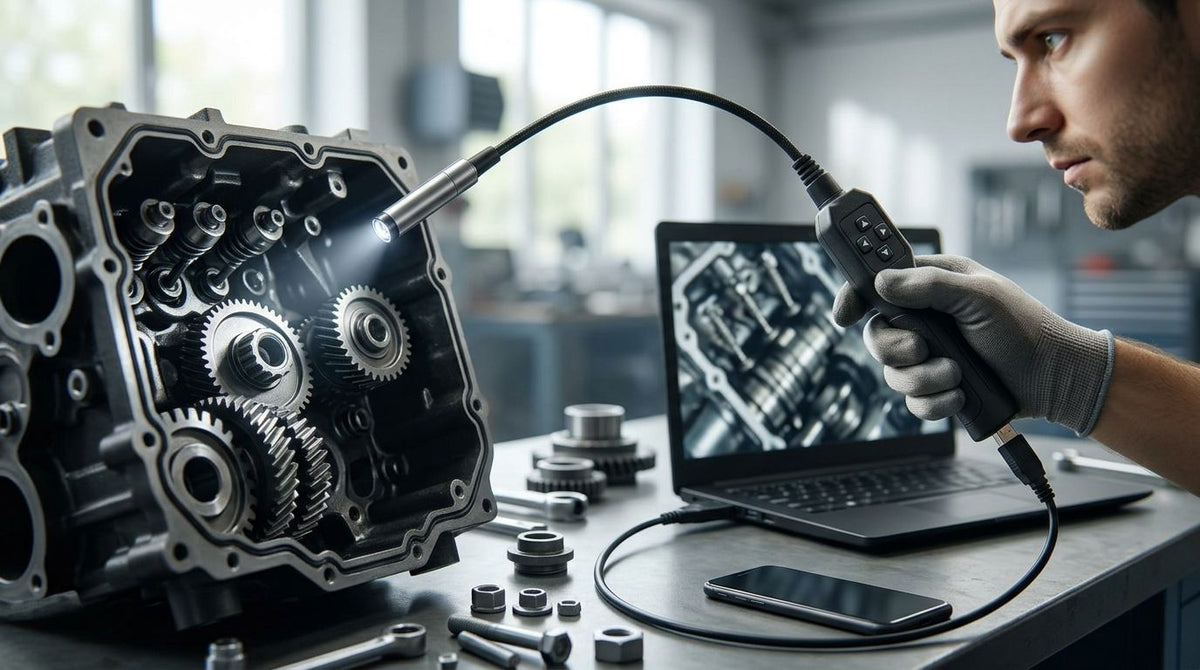
USB borescope cameras split into two very different products, and picking the wrong one means either duplicating equipment you already own or buying a probe that can't reach the bore you need. The USB Endoscope Camera is the practical pick when an optical borescope or fiberscope already sits on the shelf and only needs a way to get its image onto a screen. A self-contained unit like the Video Borescope ORION suits general inspection work where you want one integrated probe and camera, and the Micro Video Borescope MICRON is the option when the bore is too narrow for anything else on this list. This guide compares USB borescope camera options for industrial, automotive, and technical inspection work in 2026. Fiberscope sells the products discussed; recommendations are based on current published specifications and stated use cases, so confirm final configuration and compatibility with Fiberscope before purchase.
- The USB Endoscope Camera converts an existing optical borescope or fiberscope into a video system for computer display and capture.
- The Video Borescope ORION is a self-contained portable unit for general shop inspection without a separate optical scope.
- The Micro Video Borescope MICRON reaches bores as narrow as 1.1mm, the smallest access point on this list.
- A Rigid Borescope paired with a video coupler suits inspection stations already standardized on rigid-tube optics.
- Best USB borescope cameras for 2026 split into camera-only modules and self-contained probes — match the class to what you already own.
Why this matters
A "USB borescope camera" is not one product category. It covers at least two configurations that solve different problems, and the terms get used loosely enough in search results that buyers regularly order the wrong one. A camera-only module only makes sense if a working optical borescope or fiberscope eyepiece is already available to attach it to — buy one without an existing scope and it does nothing on its own. A self-contained video borescope carries its own probe, sensor, and USB connector, so it works without any existing optical equipment but cannot later be paired with a different eyepiece. Sorting this out before ordering is the difference between a working setup on day one and a return shipment in 2026.
What makes the best USB borescope camera
- Sensor and on-screen image quality — the camera or probe tip sets the resolution that actually survives on a laptop screen.
- USB connection type — USB 3.0 modules move more video data per second than USB 2.0, which generally supports smoother full-frame capture.
- Camera-only vs. complete probe system — a camera module needs an existing optical borescope or fiberscope; a complete unit needs neither.
- Coupler and eyepiece compatibility — a camera module has to physically mate with your scope's eyepiece via the correct coupler and thread.
- Probe diameter and length — the access opening and route length set a hard limit on fit before image quality matters at all.
- Illumination — built-in LED output or an add-on light source affects visibility inside dark bores and cavities.
USB borescope cameras at a glance
| Item | Best for | Standout feature | Key limitation |
|---|---|---|---|
| USB Endoscope Camera | Upgrading an existing optical borescope/fiberscope to video | Turns an eyepiece view into a computer display and recording | Needs a compatible optical scope and coupler already on hand |
| Video Borescope ORION | Portable, self-contained shop inspection | Integrated probe and camera in one compact unit | Fixed probe; not swappable to a different bore size |
| Micro Video Borescope MICRON | Ultra-thin bore access down to 1.1mm | Narrowest probe diameter on this list | Unnecessarily specialized for standard-size bores |
| Rigid Borescope + Universal Borescope Video Coupler | Rigid-tube inspection stations adding USB output | Bridges a rigid optical scope to a camera body | Needs a separate camera module purchase to output video |
1. USB Endoscope Camera: best USB borescope camera for upgrading an existing optical scope
The USB Endoscope Camera attaches to the eyepiece of an optical borescope or fiberscope already in service and outputs that view to a computer for display and capture, instead of requiring anyone to look through the scope directly. It is built around a camera body rather than its own probe, so image quality and reach still depend on the optical scope it is paired with. This is the configuration to choose when the optical scope in the shop already works fine and the only unsolved problem is recording and sharing what it sees.
USB Endoscope Camera pros:
- Adds digital capture and screen display to equipment already in service
- No need to replace a working optical scope or probe
- Straightforward eyepiece-to-camera connection for supported scopes
USB Endoscope Camera cons:
- Only useful if a compatible optical borescope or fiberscope is already on hand
- Coupler compatibility with the exact eyepiece needs confirming before ordering
- Image quality is capped by the optical scope's own resolution, not the camera alone
This is the right call for a shop standardizing on digital record-keeping without replacing existing optical scopes in 2026. Confirm the coupler mates with your exact eyepiece diameter and thread before ordering. Skip it if there's no existing optical borescope on hand — a self-contained unit removes that pairing step entirely.
2. Video Borescope ORION: best USB borescope camera for portable, self-contained inspection
The Video Borescope ORION ships as one integrated unit — probe, camera, and connector together — and is described by the manufacturer as small in size and ergonomic for handheld use. Because the probe and sensor are fixed at the factory, there's no coupler step and no dependency on an optical scope a buyer may or may not already own. That makes it a more turnkey option for a technician starting from zero rather than upgrading existing gear.
Video Borescope ORION pros:
- Self-contained; no separate optical scope or coupler required
- Compact, ergonomic form factor for handheld shop use
- One purchase covers the full camera-to-screen chain
Video Borescope ORION cons:
- Probe diameter and length are fixed to the model as sold
- Not modular — can't be paired with a different optical scope later
- Screen and software requirements should be confirmed for the exact configuration
Choose this when there's no existing optical borescope and the goal is one complete, ready-to-use unit rather than a multi-part setup. It's not the pick for a shop that already owns a working optical scope — the USB Endoscope Camera covers that case without duplicating the probe.
3. Micro Video Borescope MICRON: best USB borescope camera for ultra-thin bore access
The Micro Video Borescope MICRON is built to inspect bores down to 1.1mm in diameter, with the outer probe diameter varying by the exact variant selected. That figure is narrower than what most general industrial borescope work calls for, which puts this unit in a specific-use category rather than a general shop pick. Confirm the exact probe outer diameter and length for the access point before ordering, since micro-bore work leaves little margin for a mismatch.
Micro Video Borescope MICRON pros:
- Reaches bores no other camera on this list can access
- Purpose-built for ultra-thin inspection work, not adapted from a larger probe
- Available in variants scaled to the smallest access points
Micro Video Borescope MICRON cons:
- Specialized design makes it unnecessary for standard bore sizes
- Ultra-thin probes are more fragile and demand careful handling
- Exact probe diameter varies by variant and needs confirmation for the specific job
This is the right pick only when the access point genuinely measures near 1.1mm and nothing larger will fit. For general automotive or HVAC work where a standard-diameter probe already covers the opening, this unit is more capability than the job requires.
4. Rigid Borescope with Universal Borescope Video Coupler: best USB borescope camera for rigid-tube stations
A Rigid Borescope is an optical tube scope, not a camera by itself — it delivers a direct optical view through the eyepiece with no digital output on its own. Pairing it with the Universal Borescope Video Coupler creates the physical connection needed to attach a camera body, which is what actually turns the setup into a USB-capable system rather than a purely optical one. This path suits an inspection station already built around rigid tube scopes that now needs digital capture added.
Rigid Borescope + coupler pros:
- Rigid-tube optical clarity for straight-line inspection paths
- Coupler design bridges eyepiece to camera body across compatible scopes
- Modular — swap the camera body without replacing the optical tube
Rigid Borescope + coupler cons:
- Requires a separate camera module purchase to actually produce video output
- Rigid probes can't navigate bends the way a flexible fiberscope can
- Coupler-to-eyepiece fit needs confirming for the exact rigid scope model
This combination fits an inspection station already using rigid optical borescopes that wants to add digital output in 2026. It's the wrong call for inspection paths with bends or elbows — a flexible fiberscope-based camera reaches around corners a rigid tube cannot.


How this ranking works
Each pick above is scored against the criteria listed earlier: sensor and image quality, USB connection type, whether the unit is a camera module or a complete probe system, coupler compatibility, probe diameter and length, and illumination. None of the four items compete for the same job in this ranking — a camera module, a self-contained portable unit, an ultra-thin probe, and a rigid-tube pairing each solve a different access problem in 2026, not the same one ranked by quality.
Which USB borescope camera should you choose in 2026?
Start with what's already on the shelf. If a working optical borescope or fiberscope is already available, the USB Endoscope Camera is the lower-friction move — it adds digital capture without retiring equipment that still works. If there's no existing optical scope, the Video Borescope ORION is the more complete starting point in 2026, since probe, camera, and connector ship as one unit. Reach for the Micro Video Borescope MICRON only when the access point genuinely measures near 1.1mm, and treat the Rigid Borescope-plus-coupler path as the option for stations standardized on rigid-tube optics that now need a digital output added.
FAQ
What's the best USB borescope camera for a shop that already owns an optical scope?
The USB Endoscope Camera is built for that case — it attaches to an existing optical borescope or fiberscope eyepiece and outputs the view to a computer for display and recording. It does not include its own probe, so image reach still depends on the optical scope it's paired with.
Is a USB borescope camera the same thing as a video borescope?
Not always — a USB borescope camera can be a camera-only module that attaches to an existing optical scope, while a video borescope like the Video Borescope ORION is a self-contained unit with its own probe and sensor. Check whether a listing includes a probe or only a camera body before assuming either configuration.
Can a USB borescope camera module replace a dedicated video borescope?
It can, but only if you already own a compatible optical borescope or fiberscope to attach it to — otherwise a self-contained unit is the simpler starting point. A camera-only module adds recording and screen display to an existing optical view rather than replacing the scope itself.
What's the difference between USB 2.0 and USB 3.0 on a borescope camera?
USB 3.0 moves more video data per second than USB 2.0, which generally supports smoother full-frame capture on a connected computer. Exact throughput and frame rate still depend on the specific camera model and the computer's own port, so confirm the connection type on the product listing.
How thin a bore can a USB micro borescope reach?
The Micro Video Borescope MICRON is built to inspect bores down to 1.1mm in diameter, the narrowest access point covered in this guide. That diameter is far smaller than what most general automotive or HVAC inspection work requires, so it's a specialized pick rather than a general-purpose one.
Does a USB borescope camera work with any optical borescope?
No — compatibility depends on the coupler matching the exact eyepiece diameter and thread of the optical scope in question. Confirm the coupler fit for your specific borescope or fiberscope model before ordering a camera-only module.
What's the difference between a rigid borescope and a USB borescope camera?
A rigid borescope is an optical tube scope viewed through an eyepiece; on its own it has no digital output. Adding a video coupler and a camera body to a rigid borescope is what turns that optical setup into a USB-capable inspection system.
Is a self-contained video borescope better than a camera-plus-optical-scope setup?
Neither is universally better — a self-contained unit like the Video Borescope ORION suits someone starting without existing equipment, while a camera module suits a shop that already owns a working optical scope. The right choice depends on what equipment is already on hand and whether the probe ever needs to be swapped independently of the camera.
One last thing
The Micro Video Borescope MICRON's 1.1mm probe diameter is narrower than the opening on most spark plug holes and HVAC access ports, which is why it sits at the bottom of most shopping lists rather than the top — general inspection work rarely needs a probe that thin. Match the probe diameter to the smallest access point actually being inspected in 2026, not the smallest one that might someday come up.


Leave a comment
This site is protected by hCaptcha and the hCaptcha Privacy Policy and Terms of Service apply.