

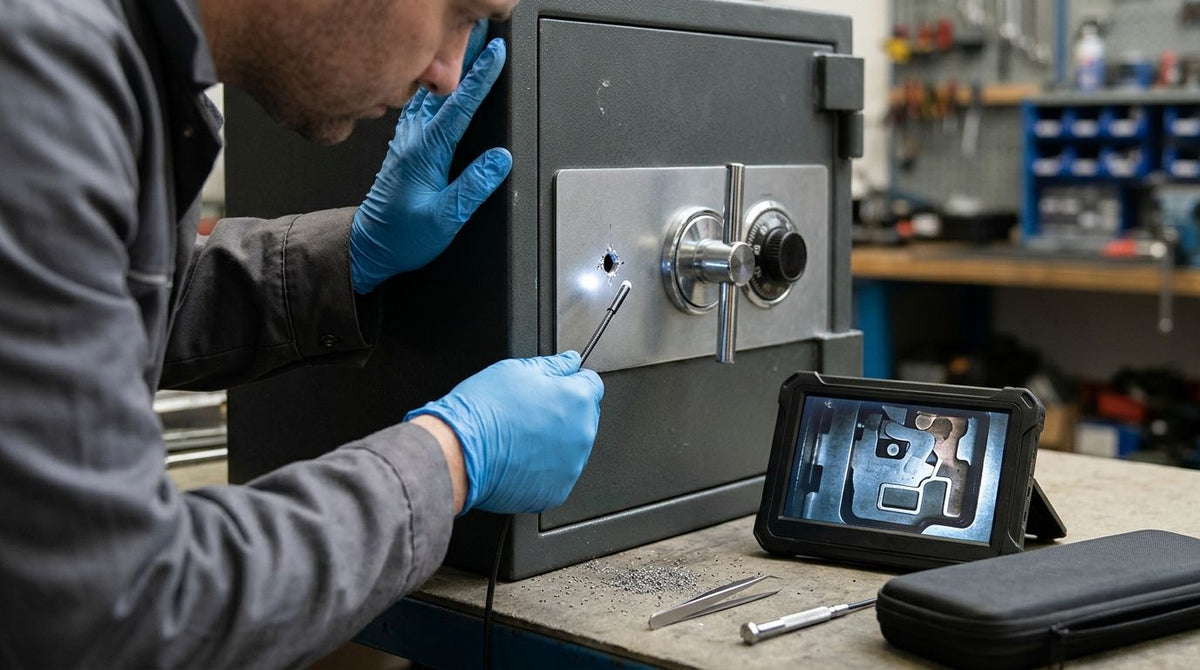
A locked safe with a failed lock leaves a technician guessing. You drill a hole to get eyes on the mechanism, then spend an hour working blind because the wheel pack, the fence and any relocking device sit out of line of sight. A micro borescope lets you look at the parts before you commit to the next cut, and it leaves a recording of what you found.
The short answer: pass a probe thinner than your drill hole through it, light the tip, and watch the mechanism on a screen or recording camera. The Super Thin Micro Borescope starts at 1.0 mm (0.04 in) probe diameter and sells from $1,750. Fiberscope.net sells the products discussed here and services them in-house.
- Probe outer diameter must be smaller than the narrowest point of your drill hole.
- The Super Thin Micro Borescope starts at 1.0 mm (0.04 in) probe diameter, from $1,750.
- An optical micro borescope needs a separate light handle and, for recording, a camera.
- Work only on safes you are authorized to open.
How do you inspect a safe lock through a drill point?
You measure the hole, light the probe, insert it slowly until the lock parts come into view, and record what you see. Four steps cover the job, and each one has a failure point worth knowing before you start.
Step 1: Measure the hole at its narrowest point
The limit is the tightest spot along the hole, not the diameter at the entry. Hardplate, a drill-resistant plate, and burrs left by the bit can narrow the path behind the door skin. Measure the bit you used, then add a margin for burrs.
A probe of 1.0 mm (0.04 in) leaves room in most small holes, but any probe thicker than the hole stops the job. If your hole is smaller than the thinnest probe you own, the honest answer is a second, larger hole or a different access point.
Step 2: Light the tip
An optical micro borescope carries light from a source through the same probe, so a light handle or light source is not optional. The Borescope LED Light Handle SPARK sells from $299. One customer, Alasdair H. M., wrote of it: "Works perfectly with my old Hopkins scope."
Inside a safe door you are looking at bare steel, so glare is a bigger problem than darkness. Start at the lowest light setting and raise it until parts separate from the background.
Step 3: Insert and steer
Feed the probe in by hand, 0.5 in (13 mm) at a time, and stop when the image changes. A probe sees in the direction its tip faces, so rotate the probe to look around before you push deeper. Pushing against a spring or a lever can bend a thin probe.
Look for the lock bolt, the wheel pack or key levers, the fence, and any relocking device. Identify these before you drill again, because a second hole in the wrong place can trigger a relocker.
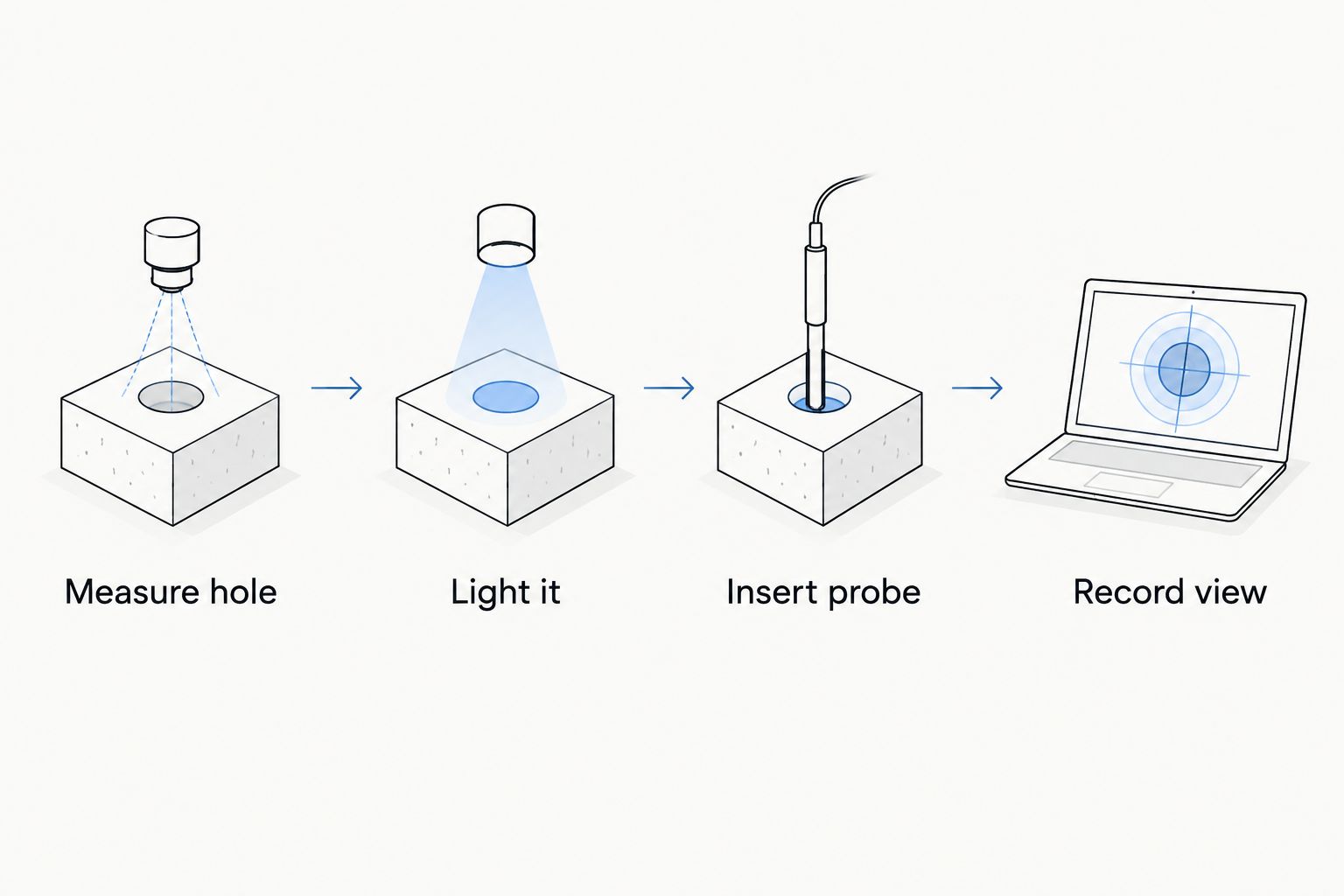
Step 4: Record the view
Watching through an eyepiece works for one person but gives you nothing to show a customer or a second technician. A camera on the eyepiece sends the image to a laptop. The USB Borescope Camera is a Windows capture camera for optical scopes with a 32 mm eyepiece and sells from $900. A Universal Borescope Video Coupler, from $250, joins an eyepiece to a camera body.


What each part of the kit does
| Part | Job | From |
|---|---|---|
| Super Thin Micro Borescope | Passes through the hole and carries the image | $1,750 |
| Borescope LED Light Handle SPARK | Lights the probe tip | $299 |
| USB Borescope Camera | Sends the eyepiece image to a Windows computer | $900 |
| Universal Borescope Video Coupler | Joins eyepiece and camera body | $250 |
Prices checked at publish. The USB Borescope Camera and the coupler are accessories. You can start with the borescope and light handle and add recording later.
Why results vary from safe to safe
- Hole size. The narrowest point sets the maximum probe diameter.
- Hole angle. A hole drilled off-axis may show you the door skin instead of the lock.
- Debris. Metal shavings and drilling lubricant coat the probe tip and blur the image.
- Reflection. Bright light on polished steel washes out detail.
- Mechanism design. Relocking devices and plate placement differ between makers, so what you see on one safe tells you little about the next.
Troubleshooting
A grey, washed-out image usually means too much light or a smeared tip. Withdraw the probe, wipe the tip, and lower the light level. A probe that stops short has met a burr or a bend, so back out and re-ream the hole instead of forcing it. If you can see the lock but cannot tell which part is which, record the view and compare it against the lock manufacturer's documentation.
A micro borescope also has limits. It shows you the mechanism, but it does not manipulate it, and a small flexible probe cannot push levers or clear obstructions. If your hole is large enough and you only need a short, straight look, a rigid borescope costs less, though it cannot bend around anything. For general locksmith kit choices, see how to choose a borescope for locksmith companies, and for the thinnest probes available compare best micro borescopes.
FAQ
What probe size do I need for a safe drill point?
The probe outer diameter must be smaller than the narrowest point of the hole. The Super Thin Micro Borescope starts at 1.0 mm (0.04 in). Measure your hole after drilling, because burrs reduce the usable size.
Do I need a separate light for a micro borescope?
Yes for optical micro borescopes. They carry light from a source through the probe, so you need a light handle or light source such as the Borescope LED Light Handle SPARK.
Can I record the inside of a safe lock?
Yes, with a camera on the eyepiece. The USB Borescope Camera connects an optical scope with a 32 mm eyepiece to a Windows computer for live video and capture.
Is it legal to drill and inspect a safe?
Work only on safes you own or are authorized to open, with the owner's consent. Keep written authorization with your job records.
Get the probe matched to your hole
Send us your drill-hole diameter, the thickness of the door, whether you need to record, and the eyepiece you plan to use, and a Fiberscope.net specialist will match the probe, light and camera. Use the contact page on store.fiberscope.net or call 1-877-613-2210, Monday to Friday, 8:00 to 18:00 CST.
About the author. Vladimir Khubiryants, Founder & President, Fiberscope.net (MEDIT Inc.), founded Fiberscope.net to give professionals access to reliable video inspection equipment without enterprise pricing. For over 20 years he has sourced and tested borescopes, sewer cameras and fiberscopes in Fiberscope.net's in-house test and repair facility, helping plumbers, pipeline engineers, aviation and military teams choose the right tool for the job. See our cameras in use on YouTube and Instagram.

Leave a comment
This site is protected by hCaptcha and the hCaptcha Privacy Policy and Terms of Service apply.