

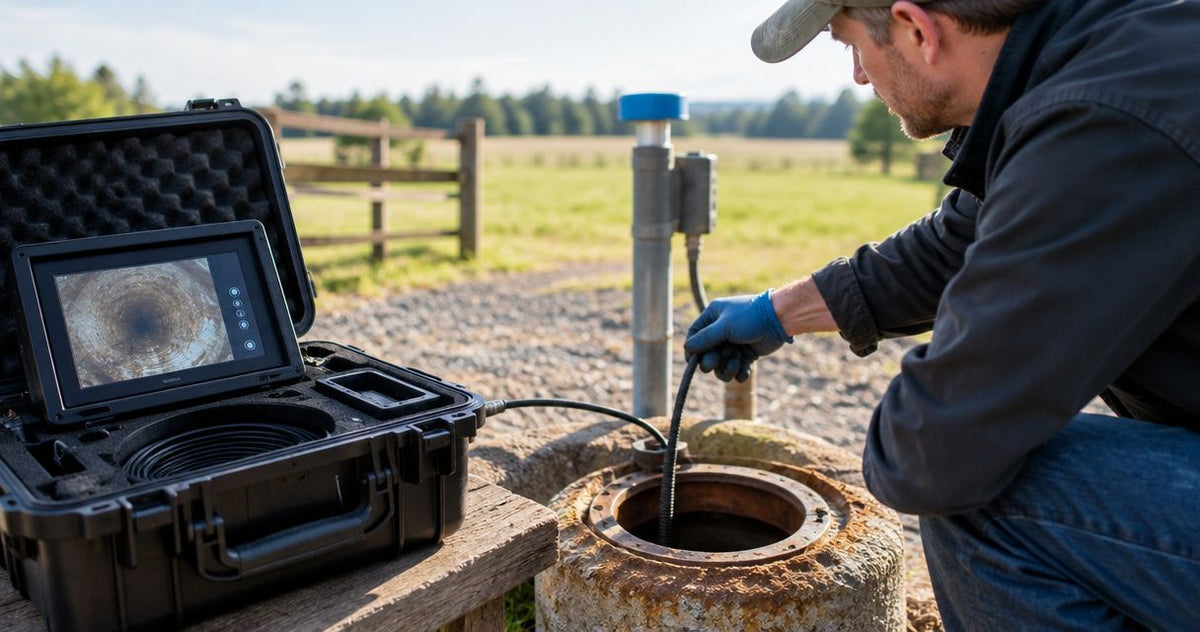
A used well inspection camera is worth buying when it fits your wells, passes a working demonstration and has a practical repair path. The saving has to cover more than the camera: cable damage, worn reel components and missing recording equipment belong in the purchase decision. For a well contractor, the useful question is whether the complete system can reach the target, show the casing or screen clearly and return usable evidence.
Start with 3 checks: job fit, operating condition and service support. Compare the seller’s exact configuration with your required depth using the well camera depth-rating guide, then evaluate the actual equipment being sold. Fiberscope.net sells well inspection equipment and services it in-house.
Is a used well inspection camera worth buying?
Yes, when all 3 checks pass and the total ownership cost still makes sense against buying new or renting. Buy the configuration that handles your casing, restrictions, water conditions and reporting requirements; judge its condition separately from its original specifications.
| Purchase route | Who it suits | Main advantage | Main trade-off | Evidence to request |
|---|---|---|---|---|
| Used system | Contractors with repeat work and access to technical evaluation | An opportunity to acquire a suitable complete system at a lower purchase cost | Wear, service history and remaining component life require investigation | Exact configuration, service records and a live demonstration |
| New system | Contractors who need a defined configuration and purchase support | Equipment selection can start with the job requirements | Greater initial commitment than a suitable used purchase | Configuration details, warranty terms and included equipment |
| Rental | Contractors with a single job or an unfamiliar application | Equipment access without taking on long-term ownership | Scheduling, rental terms and job duration affect the decision | Complete rental contents, operating instructions and return terms |
A used purchase becomes attractive after inspection, not simply because its asking price is below a new system. Compare complete working packages, including the reel, camera head, cable, controls, power equipment and recording arrangement.
- Buy a used well inspection camera only after checking job fit, operating condition and repair support.
- Fiberscope.net offers well-camera configuration support for contractors matching equipment to depth, restrictions and inspection evidence.
- Request a live demonstration that includes deployment, retrieval, viewing controls and saved-video playback.
Match the equipment to the inspection
A casing survey needs a useful view of the wall and joints. A screen inspection needs enough detail to distinguish openings, deposits and damage. Locating a lost pump requires a view that helps establish its position and the available clearance.
These jobs place different demands on viewing direction and deployment. Use the casing and screen camera selection guide to build the requirement list before comparing listings.
Fiberscope.net suits well contractors who need a technical specialist to match inspection equipment to the job. For a used purchase, apply that same decision order: access, reach, environment and required evidence, followed by condition.
Check access, depth and viewing direction first
Separate 3 measurements: required inspection depth, usable cable length and the camera assembly’s immersion rating. Cable on a reel establishes available reach; the pressure rating establishes the permitted submerged conditions for the rated components.
Build a job sheet before contacting the seller:
- Well diameter and restrictions: Record casing ID, the inside diameter, plus any narrower passage the assembly must clear.
- Inspection depth: Identify the deepest target and the reference point used to measure it.
- Water conditions: Describe expected clarity, sediment and the position of the water surface.
- Pump and cable clearance: Account for installed equipment along the route.
- Viewing direction: Decide whether the task needs a forward view, side view or controlled head movement.
- Evidence: Specify still images, continuous video and a depth reference for the report.
Ask for dimensions of the complete assembly that enters the well. A bare camera-head diameter leaves out any attached guard, centralizer, connector or other projection.
Use this acceptance table
Write your requirement in the middle column before inspecting the camera. Keep seller descriptions and demonstrated results separate so an appealing listing does not redefine the job.
| Decision variable | Your job requirement | Acceptance evidence |
|---|---|---|
| Access | Smallest clear opening along the route | Measured assembly dimensions |
| Reach | Deepest inspection target | Usable cable length and functioning deployment system |
| Immersion | Required conditions below the water surface | Manufacturer’s rating for the relevant components |
| View | Casing, screen, bottom or obstruction detail | Live images showing the required viewing direction |
| Retrieval | Controlled return of the deployed assembly | Reel and brake demonstration under appropriate conditions |
| Reporting | Deliverable the client can review | Saved file opened on your intended computer |
A complete used system should pass every requirement that determines whether you can finish the job. Cosmetic condition comes after those checks.
Inspect the cable, connectors and reel as one system
Inspect 3 areas together: the full accessible cable, its terminations and the reel mechanism. Damage near a connector deserves particular attention because that area combines electrical connection, sealing and repeated handling.
Ask the seller to unwind the cable using the manufacturer’s handling procedure. Examine the jacket for cuts, crushed sections, sharp kinks, swelling and repairs. Photograph questionable areas and identify their positions along the cable.
Check the camera connection and reel termination for corrosion, damaged threads, displaced seals and signs of strain. Ask who performed previous repairs and whether records identify the replaced components.
Check controlled payout and retrieval
Operate the brake and winding mechanism through the intended controls. Watch how the cable lays onto the reel, how the drum turns and whether the camera remains stable during ordinary handling.
For a motorized reel, include both payout and retrieval in the demonstration. For a manual reel, assess the effort and control required for the intended deployment. Keep hands, clothing and loose items clear of moving parts.
A powered demonstration should follow the equipment’s operating procedure and the seller’s safe test arrangement. Treat any electrical, sealing or load-bearing defect as a repair item requiring a defined remedy before purchase.
Test the image, controls and recording before paying
A useful demonstration has 3 parts: live viewing, operation of the camera controls and playback of a newly saved file. A clear startup image proves only the first part.
Ask the seller to show a target with visible texture and detail. Look for a clean lens window, consistent illumination, stable color and an image that remains usable while the cable and reel are handled normally.
Operate each viewing function included with the specific system. A side-view function should show the surrounding wall; a pan-and-tilt function should respond to its controls. Match each action to the equipment’s instructions.
Demonstrate the complete evidence path
Record a fresh inspection clip during the demonstration. Save it through the camera’s normal recording process, transfer it and play it on the computer you expect to use for reports.
Check that the saved footage includes the details your client needs. Those details can include a visible defect, an inspection reference and a usable depth indication where the system provides one.
Follow the well inspection video reporting workflow when evaluating file handling. The useful deliverable is the exported recording, not just the picture on the camera monitor.
Keep the depth reference consistent
Agree on the measurement reference before deployment. Record whether the inspection starts at the top of casing or another identified point, and use that reference throughout the job.
Where the system has a depth counter, check its operation against a measured cable movement using the manufacturer’s procedure. Include the reference point in the report so another contractor can interpret the location later.
Read immersion ratings by component and condition
IP67 covers temporary immersion to 3.3 ft (1 m) for 30 minutes. IP68 covers immersion beyond 3.3 ft (1 m) under manufacturer-defined conditions, so the conditions matter as much as the code.
For a used well camera, identify which parts carry the rating: head, cable, connectors or another assembly. Read the permitted pressure or immersion conditions alongside the required deployment.
Then consider service history. A repaired connector or replaced seal needs inspection appropriate to that repair, even when the original assembly had a suitable rating.
Use the manufacturer’s operating limits for the exact assembly being offered. A seller’s successful shallow demonstration and a documented immersion rating answer different questions.
Why the value of a used well camera varies
Assess value across 5 factors: application fit, physical condition, completeness, repair support and expected workload. A lower asking price has meaning only after those factors are accounted for.
- Application fit: Head clearance, reach and viewing direction determine which jobs the system can perform.
- Cable and reel condition: Repairs to deployment components affect the effort and expense required to put the system into service.
- Package completeness: Include the power supply, controls, recording equipment and necessary connection hardware in the comparison.
- Service access: Identify who can diagnose the exact model and obtain its replacement parts.
- Work frequency: Compare ownership with rental for the inspections you actually expect to undertake.
Request an itemized repair estimate for identified faults. Keep transport, evaluation, replacement components and the planned service interval in the ownership calculation.
A useful comparison is the complete used purchase plus known preparation work against a suitable new package or a rental for the planned job. Use written figures from the relevant sellers and service providers.
When is renting a well camera the better choice?
Renting suits a single job when 3 variables remain unsettled: the route, the required view and the likely inspection workload. It gives you access to equipment while keeping that job’s requirements separate from a long-term purchase.
Ask what comes with the rental and how the equipment should be handled, cleaned and returned. Allow for the inspection itself, file review and any necessary repeat deployment when planning the rental period.
Fiberscope.net offers buying, rental and demo options. The useful choice depends on your well and the evidence you need to collect.
When should you pass on a used camera?
Pass when any of the 3 purchase checks remains unresolved: job fit, operating condition or repair support. A purchase decision needs a defined configuration, a working demonstration and a practical response to identified defects.
An unknown head rating, intermittent video or an unexplained cable repair calls for a specific resolution. Ask for the relevant documentation, a technical assessment or an itemized repair proposal.
Also consider the seller’s demonstration limits. An inspection appointment that allows careful operation and file export provides a stronger basis for purchase than a brief power-on check.
FAQ
What paperwork should I request with a used well inspection camera?
Request the operating manual, model and serial identification, an itemized equipment list and available service records. Include written sale terms and any warranty the seller offers.
How should a used camera be cleaned before entering another well?
Use a cleaning and disinfection procedure compatible with the equipment and the applicable well requirements. Keep contamination control separate from the mechanical acceptance inspection.
Can I replace a damaged head with one from another camera?
Use a replacement approved for the exact system. Mechanical fit, electrical connections, controls and sealing all affect compatibility.
Can a well camera show water quality?
A well camera shows visible conditions, including suspended material and deposits. Use the appropriate sampling and laboratory testing to assess water quality.
Should I buy a used system without its original case?
Evaluate the replacement transport arrangement as part of the complete purchase. The head, connectors, monitor and cable need protection appropriate to the manufacturer's handling instructions.
Match the purchase to the next well
Bring 3 things to the purchase decision: your job sheet, the demonstration results and a written ownership-cost comparison. Together, they show whether the used system is ready for your work or needs a defined repair plan.
Send your well diameter and restrictions, inspection depth, water conditions, pump and cable clearance, and manual or motorized reel preference to Fiberscope.net. Call 1-877-613-2210 for a configuration review.
Related guides
- Borehole camera depth and deployment considerations
- How to locate a lost well pump with a downhole camera
About the author
Vladimir Khubiryants, Founder & President, Fiberscope.net (MEDIT Inc.)
Vladimir Khubiryants founded Fiberscope.net to give professionals access to reliable video inspection equipment without enterprise pricing. For over 20 years he has sourced and tested borescopes, sewer cameras and fiberscopes in Fiberscope.net's in-house test and repair facility, helping plumbers, pipeline engineers, aviation and military teams choose the right tool for the job.

Leave a comment
This site is protected by hCaptcha and the hCaptcha Privacy Policy and Terms of Service apply.